
Reach Thousands Instantly with Next Gen WA Message
No number saving required, send attachments
-
0 +
The years of our experience
-
0 +
Trusted businesses across the Globe
-
0 %
Client improved their condition

Powerful Pro Features you shouldn't miss
BEST IN CLASS

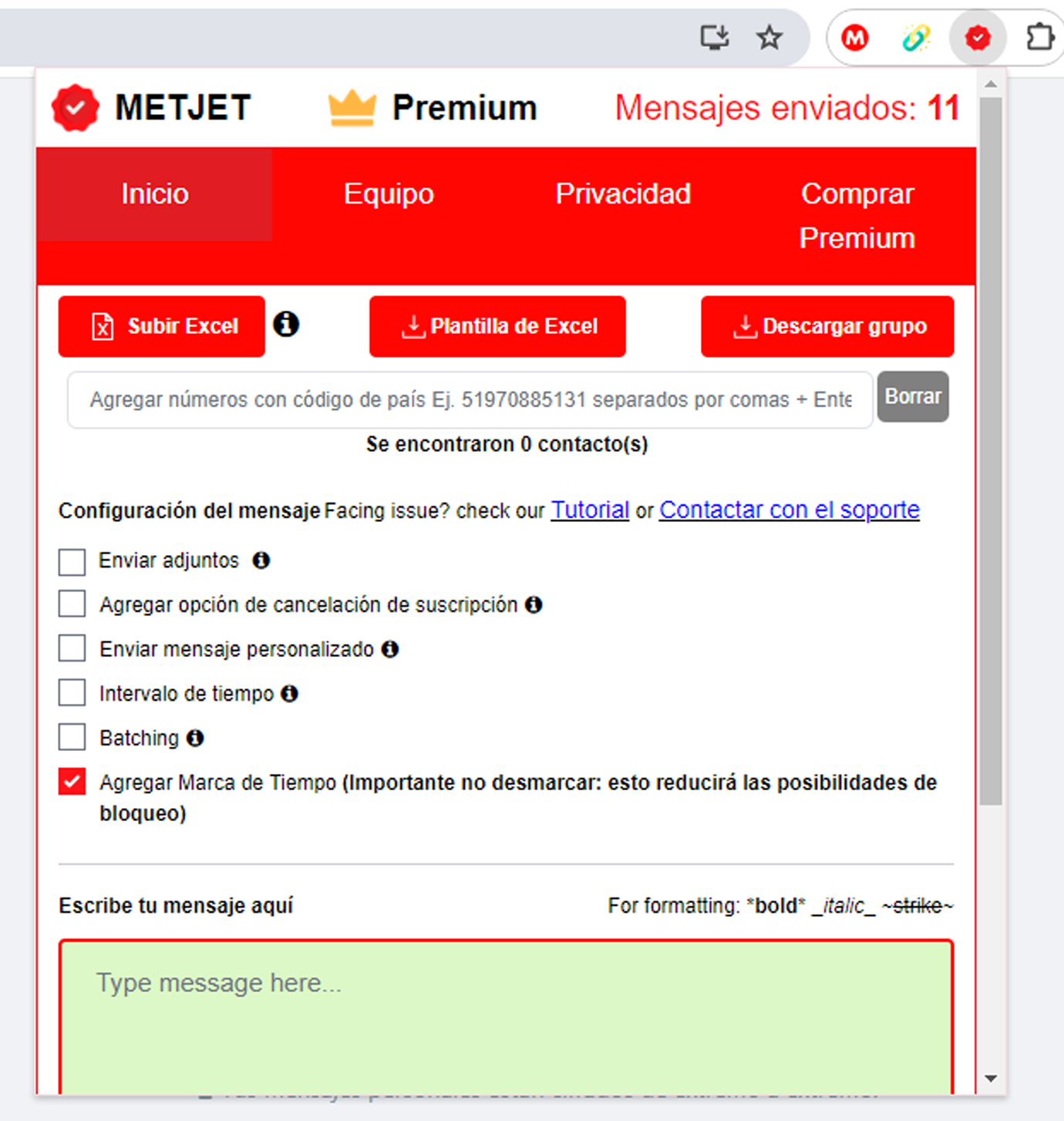
Personalized Messages
Send personalized wa messages to your subscribers using an excel file. Delight one self and bring more conversions
More Info
Send Links
You can send auto links to all your premium subscribers to increase traffic on your web, shop or your blog
More Info
Send 7 Attachments with Caption
Using METJET - wa self sender, sending image/ videos with caption is a piece of cake. You can send up to 7 attachments to a single number
More Info
Unsubscribe with a Message!
Give the freedom to your premium subscribers to unsubscribe you just by sending a simple text instead of reporting or blocking you
More Info
24 X 7 Support
All queries are answered within 12 hours, even on holidays. Get a great experience by being in close to us via quick pro WhatsApp support
More Info
Export Group(s) contacts
Download all your group/chat contacts in a excel file which you can further upload to send messages using WAMessager- wa self bulk sender itself
More Info
Premium Privacy Blur
Protect your personal or premium conversations, profile pictures from prying eyes by a simple click More Info

Self Quick Reply
Add commonly used replies to the quick reply tab to quickly send the reply with just a click
More Info
Import numbers directly
Upload a excel file to import all your contacts directly into WAMessager: WA Pro Sender
More Info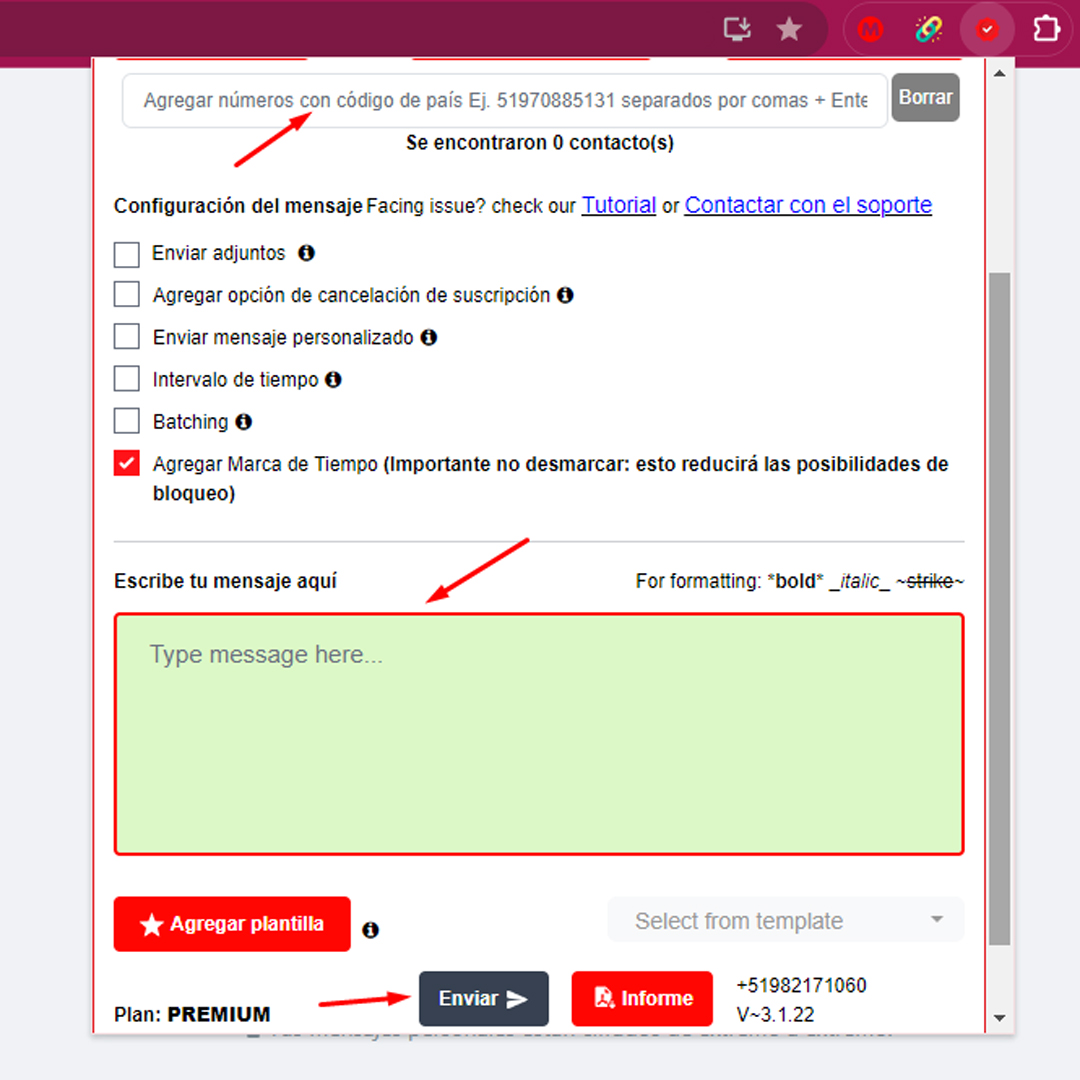
WA WAMessage — cutting-edge Tech
and simple WA WAMessage UI you can automate your WhatsApp Bulk Messaging in 3 steps.
- 🔢 Enter the recipient number(s) or upload excel sheet
- 💬 Type the message & add attachments (if any)
- 👆🏻 Click send button
Pricing Plans
Your plan will be activated on the WhatsApp number you provided, including the country code, during checkout. Feel free to cancel your subscription at any time by messaging our Support team on WhatsApp or mail.
Light Session - 1 User
- 1 WA Number Activation
- Send Unlimited Messages
- Send Personalized Messages
- Send Attachments with Captions
- Add Time Delay between Messages
- Give Unsubscribe Option
- Download Group Contacts
- Filter Excel Numbers
- Priority Support
Most Popular
Business - 5 Users
- 1 Admin WA Number Activation
- 4 Extra Team Members
- Send Unlimited Messages
- Send Personalized Messages
- Send Attachments with Captions
- Add Time Delay between Messages
- Give Unsubscribe Option
- Download Group Contacts
- Save Message Templates
- Filter Excel Numbers
- Set Privacy Blur
- Number Replacement
- Send Quick Replies
- Priority Support
- Google Meet/ Zoom Support
Team - 3 Users
- 1 Admin WA Number Activation
- 2 Extra Team Members
- Send Unlimited Messages
- Send Personalized Messages
- Send Attachments with Captions
- Add Time Delay between Messages
- Give Unsubscribe Option
- Download Group Contacts
- Save Message Templates
- Filter Excel Numbers
- Send Quick Replies
- Set Privacy Blur
- Priority Support


Check out what Businesses say about METJET- WA Message
What some of our 20,000+ customers across globe think of METJET - best wa self message sender

METJET is the great WhatsApp bulk message sender extension that makes it easy to send bulk messages on WhatsApp for Free. Like best WA sender I found till date. The interface is simple and easy to use, and the support team is very helpful. I highly recommend it!

METJET is one of the best wa sender extensions available and it is worth for Money you spend. I am using the best wa premium sender extension, it work amazing to send bulk messages.Best WA
I highly recommend you try METJET, which is the best WhatsApp bulk sender in the wa self sender. It's built up with great technology and excellent support
FAQ WhatsApp Bulk Sender
If you have more queries, you can directly connect with us on SUPPORT Already loving us! Do review us at Chrome Store.
It happens sometimes because of the following reasons.
Some minor hang-up issues – Just reload WhatsApp Web and that will solve the issue most of the times.
Slow internet connection – Make sure both mobile and computer have a fast internet connection. You can check the internet speed on fast.com minimum recommended internet speed is 5 MBPS on both mobile and computer.
Some other extension in your browser interfering with your WhatsApp web data.
Step 1: Create a new browser instance
Step 2: Open the new browser instance and install WAMessager
Step 3: Login on WhatsApp Web. If this works then you can use this browser instance for using WhatsApp web.
If all this does not work, try to uninstall and reinstall WhatsApp on your phone
Step i: Take a backup
Step ii: Uninstall
Step iii: Re-install
Step 4: Open WhatsApp Web. If the issue is still not resolved!! Put a comment below or contact us through chat and we will resolve this for you!
First of all, why is profile picture relevant to avoid number banning?
There are a lot of scammers out there who are WhatsApp messaging.
If you send WhatsApp message from a WhatsApp number where there is no profile picture (or privacy settings on) then the user receiving the message will not be able to see your photo/name.
And if the message is promotional then the user will definitely think that you are a spammer and there is a very high chance that they will report you.
If too many people block or report your number too fast then WhatsApp will ban or suspend your number from their platform.
If you don’t want to come across as a spammer the least that you can do is have a profile picture and name that is easy to recognize and makes you come across as genuine.
Also, make sure that your privacy settings appropriately set so that the user can see your profile picture and name even if he does not add your number or you don’t add his number. i.e. set the About and Profile photo option in the privacy settings to ‘Everyone’.
Can only use one WhatsApp web with one chrome browser but with this simple trick you can use multiple WhatsApp from a single computer Create two chrome instances in the same computer
Step 1: Create a new browser instance
Step 2: Open the new browser instance and install WAMessager
Step 3: Login on to WhatsApp Web on the new browser by scanning another WhatsApp.
If you face any difficulties with using this then please contact the chat support team.
1.You can’t send more than 50 WhatsApp messages per day. That’s it. Rest all features are open.
2.If you want to use unlimited message feature then you need to buy METJET Premium.
Estas son las cosas que puedes hacer con la versión gratuita de WAMessages sin pagar un solo centavo.
1.Envía mensajes individuales de WhatsApp sin guardar números.
2.Enviar 50 mensajes de WhatsApp por día
3.Cargar la hoja de Excel y enviarla a cualquier país
4.Filtrar números de WhatsApp
5.Descargar contactos de grupo/chat
6.Usar opciones de privacidad
7.Enviar respuestas rápidas
8.No se necesita instalación de software solo una simple extensión de Chrome.
9.WAMessages Mensajería gratuita. Así que no temas al virus
10. Extremadamente fácil de usar.
As of now to the best of our knowledge, we can say that every country in the world can use the free version of the extension. If that changes anytime in the future we will update it here.
We use Izipay for excepting payments from any country other than India (and also PayPal in some exceptional cases). So if you can use your debit card or credit card to make the purchase then you can use the pro version as well.
Any questions regarding payment feasibility please contact the chat support team.
No, it is a Chrome extension and it works only on WhatsApp web on Google Chrome and Microsoft Edge Browsers (Mac, Windows, and Linux).
Sorry, you need to use your computer to use this tool
None of the personal or business data is stored by METJET servers.
What Data Do We Store?
We just store basic data like
1.Account id (primary phone number for the account)
2.License status (to check if the user is free or pro user)
If you have any other questions about data security with our tool then you can contact the chat support team or request a callback!
You can send a clickable link to anyone who
1.Either has your number saved in his phone book
2.Or has replied to you at least once on WhatsApp.
1.Select the numbers column -> Right Click -> Click on ‘Format Cells’.
2.Go to the ‘Number‘ category -> Go to ‘Decimal Places‘ box
3.Change it ‘0’ and click ‘OK’.
4.Verify that the numbers are now coming correctly
No limit from our side however WhatsApp might ban your number temporarily if too many people report you as spam in a single day!
Be careful about the number banning aspect.
We do not take responsibility for number blocking!
No!
Buying the Premium Version does not guarantee that your number will not be blocked. It only gives you access to additional premium features like sending attachments, customizing messages through an Excel sheet(CSV file), and much more…
Here are some recommendations to reduce the chances of number blocking!
1.Format the messages in an interactive manner. Such that the person receiving the message thinks that it’s a real conversational message instead of a robotic -promotional message.
2.Set a random time gap between messages.
3.Send name-customized messages.
4.Don’t send from your personal/main business number.
5.Start slow, increase the number of messages gradually (Ex – Day 1: 100 messages in 2 slots, Day 2: 150 Messages in 3-4 slots).
6.Don’t send over WiFi (Use mobile internet).
7.Don’t send to unknown contacts, obtain prior consent before sending the messages.
8.Don’t send more than 100 in one go
9.Don’t send more than 500 messages on the first day.
NOTE: THESE RECOMMENDATIONS ARE ONLY FOR YOUR HELP. THE NUMBER MIGHT GET BLOCKED EVEN AFTER FOLLOWING THIS!
Do read For more deep knowledge: Minimize Whatsapp Ban with Wamessager
See what you can do to make sure that people do not report you and what you can do AFTER your number gets blocked.
1.In the first message share a relevant update.
2.Phrase it like a question. So they will give an answer.
3.Give them an option to opt-out.
Yes.
But before I tell you the process for that let’s see why number gets banned in the first place.
In one line, if multiple people report your number as spam back-to-back (in quick succession) then WhatsApp will ban your number.
And if you want to avoid banning then you need to make sure that you do not fall in the above category.
But once your number is banned what can you do?
1.If it is the first time that the number has been banned then you don’t have to worry too much!
2.Try to log in from that number again you will see an option to submit an appeal with WhatsApp.
3.Click on submit an appeal and you will see a text box where you can type your message, Say something like- “my number was banned by mistake please unban it ASAP“.
4.Do this and the number will be unbanned within a period of 1 to 48 hours.
1.In the first message share a relevant update.
2.Phrase it like a question. So they will give an answer.
3.Give them an option to opt-out.
This is an unofficial enhancement of WhatsApp to increase its functionalities for business use cases.
This Chrome plugin is not endorsed or certified WhatsApp™ Inc.
                              This is an unofficial enhancement tool for it.
                              This software is not to be used against policies of WhatsApp™ Inc in any manner.
METJET can be used to send bulk messaging campaigns with unlimited messages to people without saving their numbers. Our advanced algorithms protect your numbers from getting banned which running such large-scale campaigns. Some other Tools Offered are: